Conclave Download

Latest release

Your own hub for AI agents.

Conclave runs on a computer you control. Chat and code with any model, from the web, your desktop, your phone or a terminal. Your chats, code, memory and keys stay on your hub.

Download How it compares

Conclave on a desktop browser: Home opens on a chat, with an approval waiting under the composer and recent chats below it.
Conclave on a phone: the knot, a greeting and the composer.

Download

The latest release. Start with the hub on a computer that stays on, then add the apps on your other computers and your phone. Every file has a .sha256 next to it.

1. The hub

On a home server or any computer that stays on. It keeps every chat, the memory, the scheduler and your keys, and serves the web app.

Docker

Get the Compose file and start the hub:

mkdir conclave && cd conclave
curl -fsSLO https://github.com/default-cybe/conclave-releases/releases/latest/download/docker-compose.yml
docker compose up -d

Then print your login link:

docker compose exec hub conclave remote
Without Compose
docker run -d --name conclave --restart unless-stopped \
  -p 127.0.0.1:7717:7717 -v conclave-data:/data \
  ghcr.io/default-cybe/conclave:latest
docker exec conclave conclave remote

The port answers this computer only. To reach the hub from other devices, turn on remote access in Settings, or publish 7717:7717 for your network.

Proxmox container

On the Proxmox VE host, as root:

curl -fsSLO https://github.com/default-cybe/conclave-releases/releases/latest/download/conclave-lxc.sh
sh conclave-lxc.sh

It makes an unprivileged Debian container, installs the hub as a service and prints its address. Add --dry-run to see every command first.

Another LXC container or a VM

Debian 12 or 13, or Ubuntu 24.04, as root inside it:

curl -fsSLO https://github.com/default-cybe/conclave-releases/releases/latest/download/setup.sh
sh setup.sh

Linux and macOS

The script picks the right file for your system and checks it:

curl -fsSL https://github.com/default-cybe/conclave-releases/releases/latest/download/install.sh | sh
conclave serve

The same install gives you the terminal app and the device program.

The files for each system

2. The desktop app

The window, tray, quick ask and notifications. It also lets the hub use this computer's files, shells and coding tools. On first launch, enter the hub's address and a pairing code from the Devices page.

The desktop apps are not signed yet. On a Mac, right click the app and choose Open the first time. On Windows, choose More info, then Run anyway.

Windows

macOS

Linux

The AppImage needs FUSE 2. Make it executable with chmod +x, then run it.

3. Your phone, and computers with no app

Pair each one with a code from the hub's Devices page.

Android

Open the .apk and allow installs from your browser when asked. Then scan the code.

iPhone

Open your hub in Safari, then choose Share, then Add to Home Screen. It works like an app, with its own login and notifications.

There is no App Store or TestFlight build for now.

The device program alone

For a computer that should only lend its files and tools to the hub, with no app. About 5 MB.

Files and commands

Then, for example on Linux:

install -m 755 conclave-daemon-x86_64-unknown-linux-gnu ~/.local/bin/conclave-daemon
conclave-daemon pair --hub https://hub.example.com --code ABCD-EFGH
conclave-daemon install

What it does

One hub holds every chat, session, memory, routine and key. The apps on each device talk to it, and the computers you pair do the work.

Chat with any model

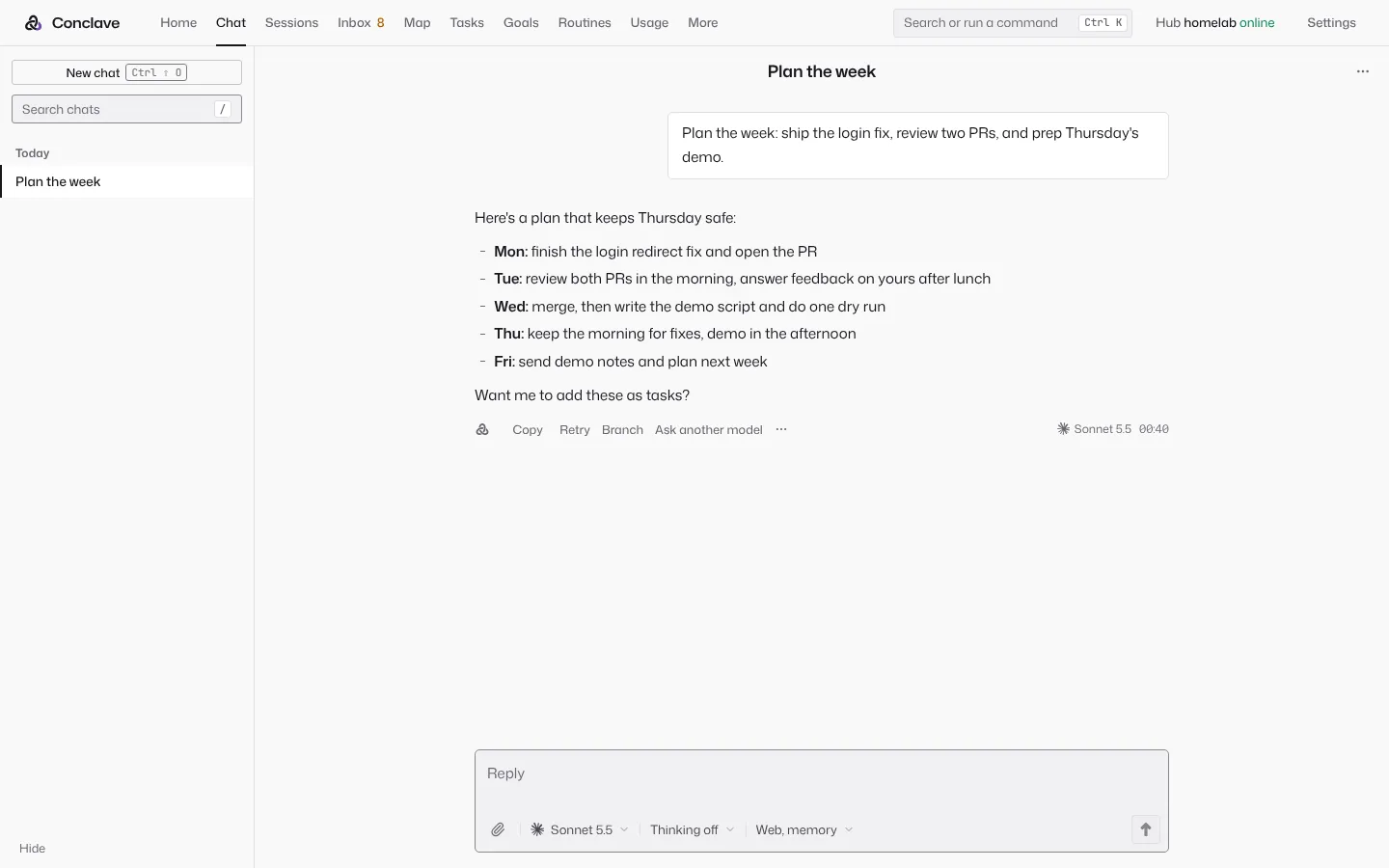
Home opens on a chat, like ChatGPT or claude.ai. Pick Claude, GPT, Gemini, GLM, a model on OpenRouter or one on your own machine. Turn thinking, web search and memory on or off for each chat.

  • Second opinion. Send any reply to another model and read its answer in line.
  • Jury and debate. Several models answer, then a judge sums up or votes. Juror names can be hidden from the judge.
  • Handoff. Switch the model in the middle of a chat and keep going.
  • Edit, retry, branch, and preview an HTML or SVG answer in a sandbox.
  • When a chat needs files or a shell, Continue as session moves it over.
A chat that plans the week, with Copy, Retry, Branch and Ask another model under the reply.

Code on your own computers

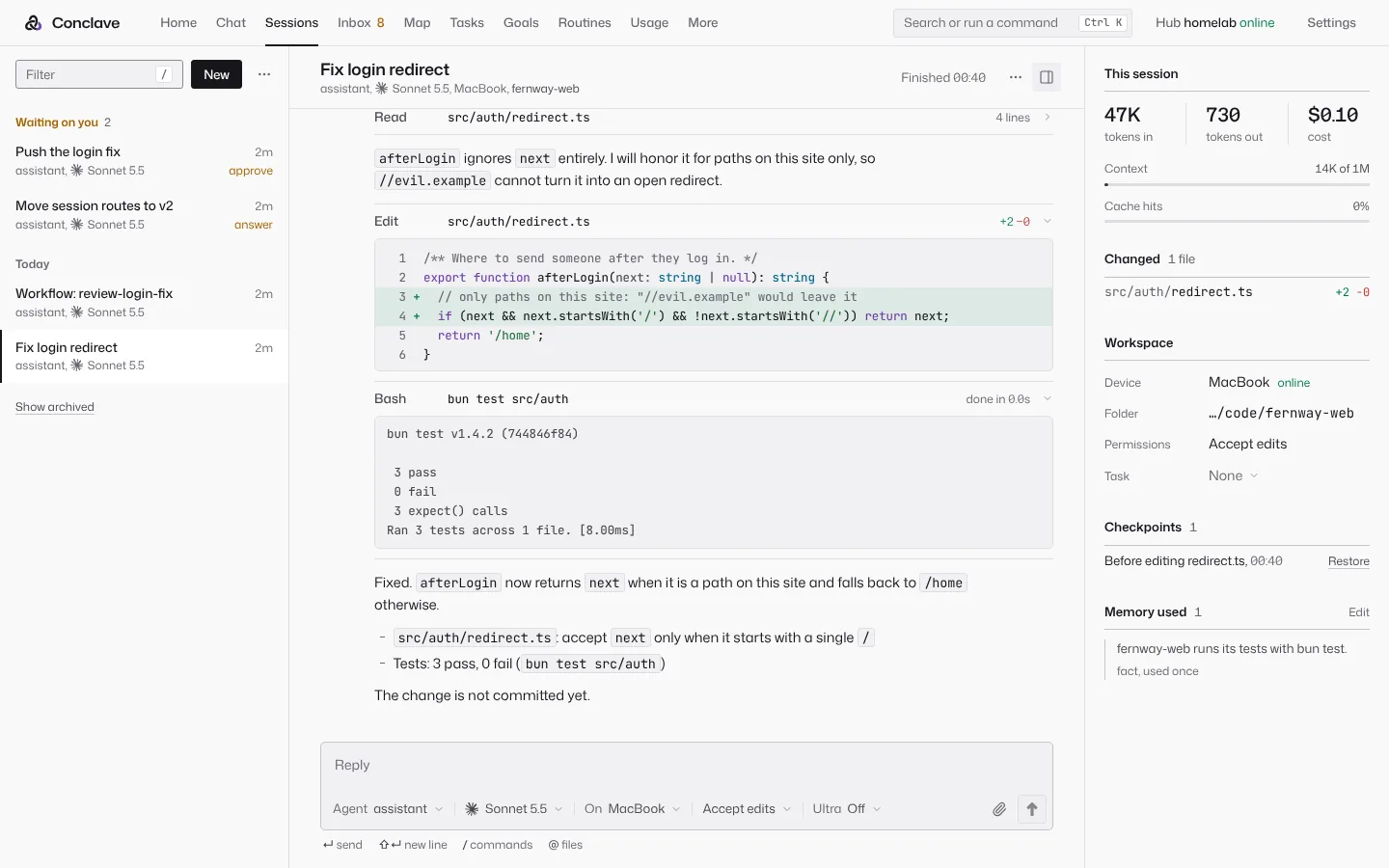
A session is an agent at work in a folder, on the hub or on any PC or Mac you pair. The agent loop runs on the hub and the tools run on the computer you pick. The desktop app carries the small program that lets the hub use that computer, and it connects out, so no port opens.

  • Conclave's own agent loop gives any model file, shell, search, web, browser and subagent tools.
  • Claude Code, Codex, Gemini CLI and OpenCode run inside Conclave too. Their permission prompts become Conclave approvals.
  • A checkpoint before each turn, so any change is one click to undo, even outside a git repository.
  • After a turn that edited files, the project's check runs on that computer before the turn may end.
  • The slash menu of Claude Code, with your commands and skills.
A coding session on a MacBook: the agent reads a file, shows its edit as a diff and runs the tests.

Projects that follow you

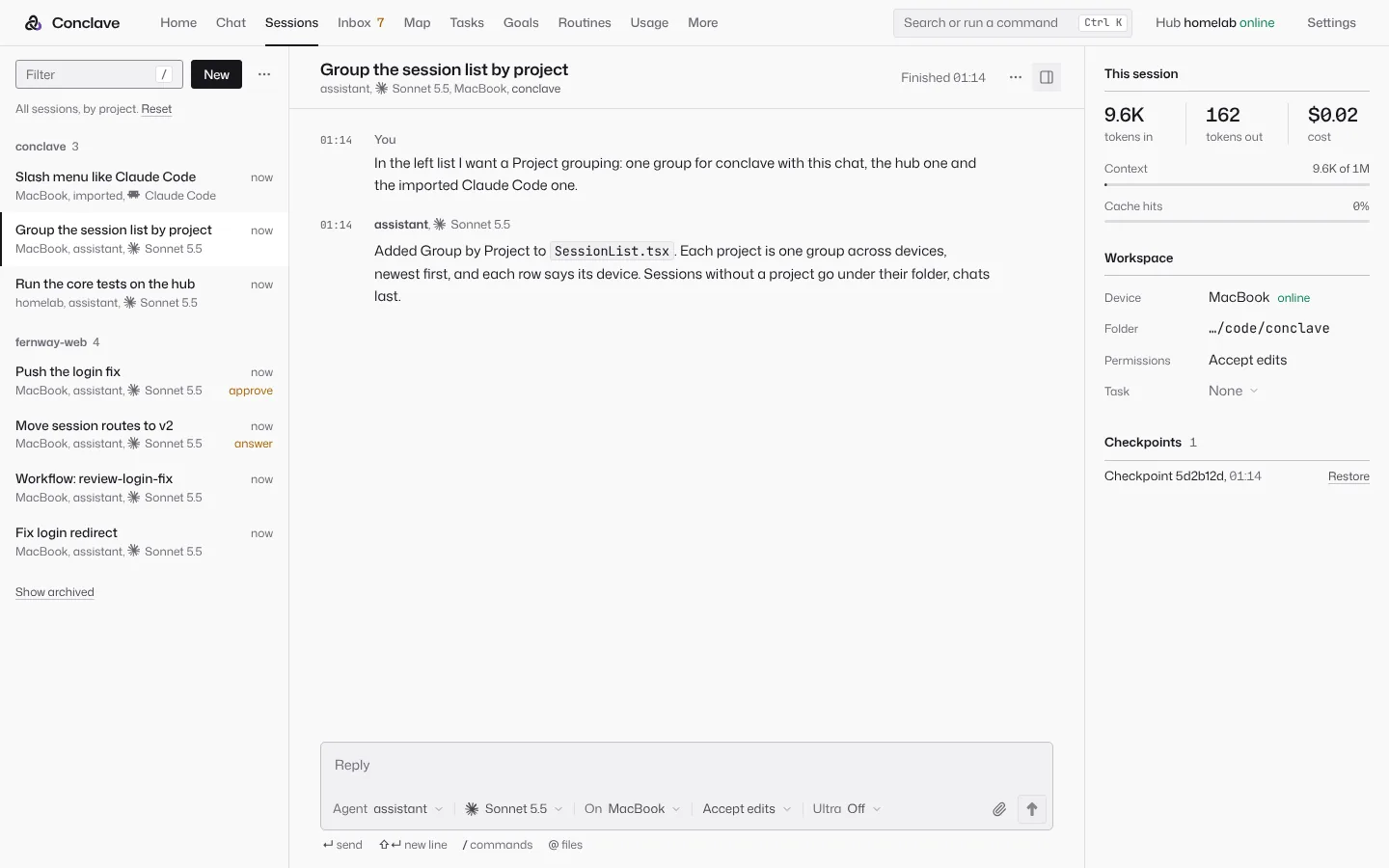
Sessions group by project or by device. Start on the PC and go on from the Mac, even when the project sits at another path there. Conclave finds the folder by its git history, Syncthing or a path it learned, and says how sure it is.

  • Repo sessions. Pick a GitHub repository, and the session gets its own git worktree on a new branch, on the hub or a paired computer.
  • Open pull request drafts the title and body from the session. The pull request's state and checks show in the session, and Clean up removes the worktree after the merge.
  • The GitHub token stays with the hub. Sessions never see it. Never a force push, never the default branch.
The session list grouped by project, each row naming its device and model.

Approve from anywhere

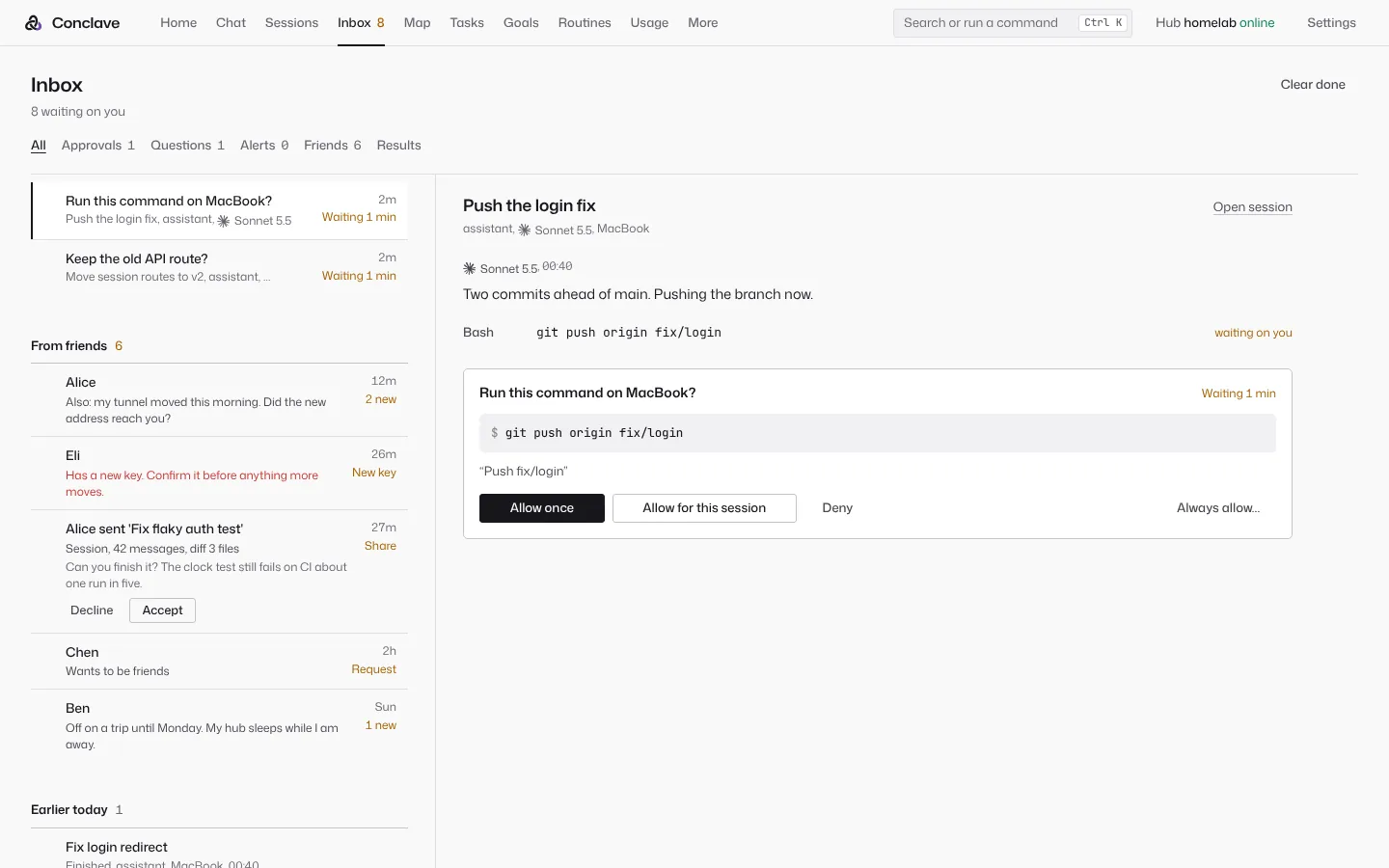
Risky commands wait for you. Allow or Deny from the Inbox, from the conversation, or right on the notification on your phone.

  • Allow, ask and deny rules in Claude Code's syntax, permission modes, and a full audit log.
  • A guard asks before rm -rf /, mkfs, force pushes to main and the like, in every mode.
  • Agents that read mail or web pages get only the tools their rules name, and every other call asks.
  • Alerts when a session makes no progress for 5 minutes, or when two chats edit the same file.
  • Notifications come from the hub itself: Web Push, the desktop tray and the Android app's own connection. No outside service. They stay quiet while you are at the desk.
The Inbox: an approval to run git push on a MacBook, a question, alerts and messages from friends.

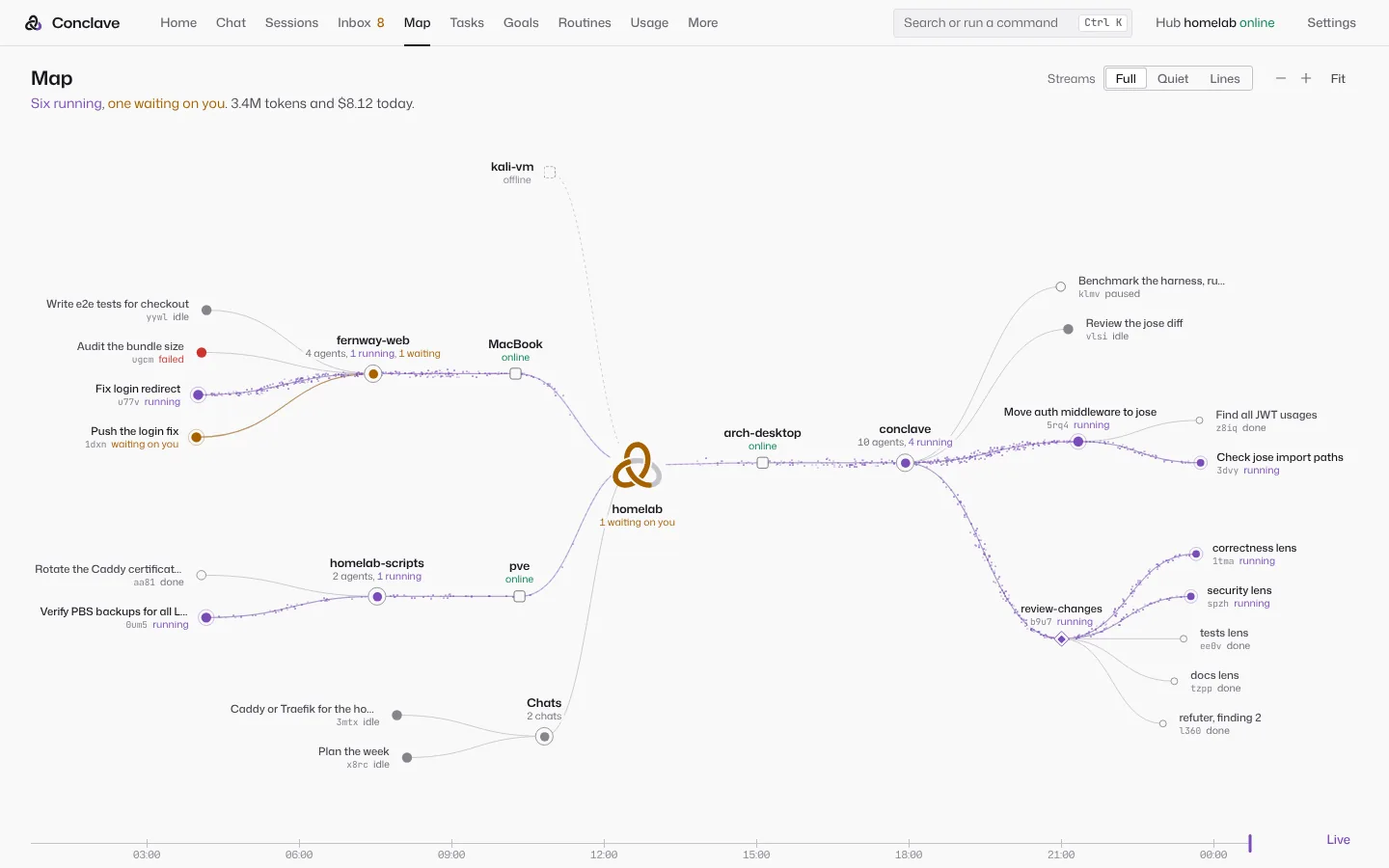
The Map

One page shows everything the hub is doing. The hub's knot sits in the middle, devices and projects branch off it, and every chat, session, subagent and workflow agent of the last 24 hours is a dot: violet while it runs, amber while it waits on you.

  • Streams follow each agent's token rate to its project and on to the hub.
  • Open a node for its model, device, last tools, usage, and Stop.
  • Stuck agents and file conflicts are drawn on the map.
  • Replay scrubs back through the day.
The Map: the hub's knot in the middle, devices and projects around it, and agents as dots with streams flowing to the hub.

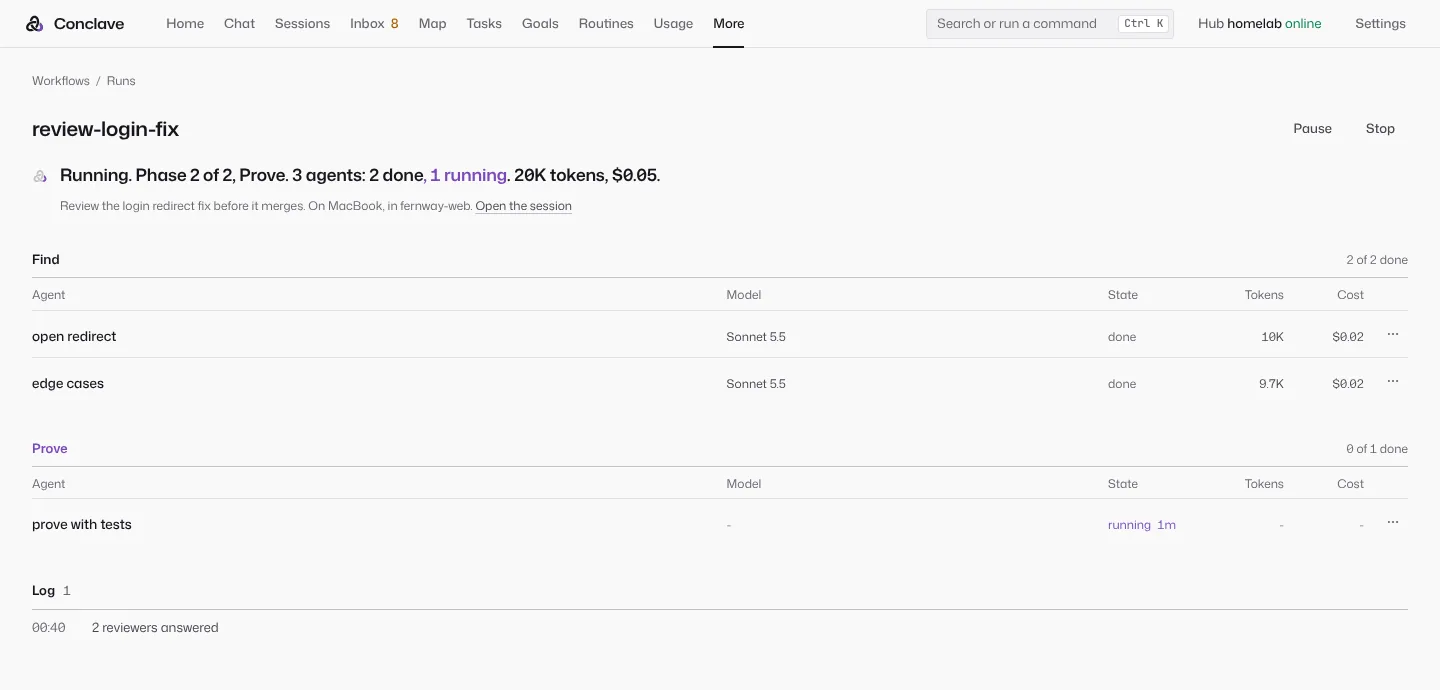
Workflows: many agents, checked in code

A workflow is a script that sends work out to many subagents and checks what they claim. Scripts in Claude Code's workflow format run as they are.

  • Twelve ship, among them review changes, deep research, fix until green, fix an issue, bug hunt and security audit.
  • A refuter panel tries to disprove each finding, and a quote must sit within 3 lines of the line it cites.
  • Runs resume after a crash, keep to a budget, and give risky agents their own git worktree.
  • Specialist agents (builder, tester, debugger, verifier, fact-checker and more) ask for a fast, smart or deep model.
A workflow run in its second phase, with each agent's model, state, tokens and cost.

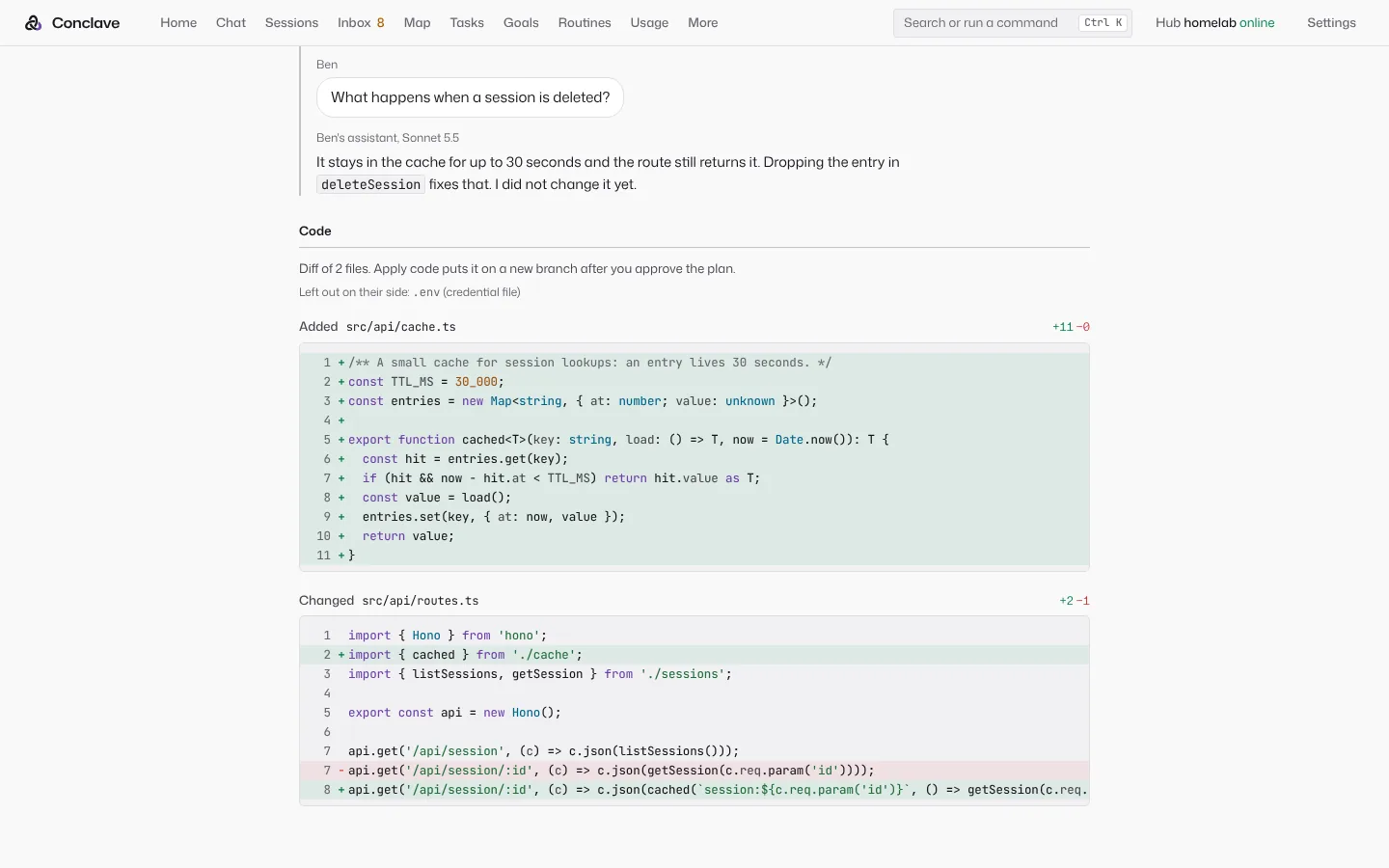
Friends, hub to hub

Send a chat, a session or code from your hub to a friend's hub. There is no service in the middle, and nothing is reachable without a friend's key.

  • Invite with a link or a QR code, then compare a safety code.
  • Before you send, a review shows what it took out: secrets, emails, private addresses, device names and home paths.
  • Your friend can fork it, hand it off, keep it as a reference, or apply the code to a new branch.
  • Unsend asks their hub to delete its copy.
  • A friend's message is data. It cannot approve or run anything.
A session a friend shared, with its diff and a note that a credential file was left out.

Also in the box

Memory

One memory for every model and device: a profile, facts recalled when they matter, and summaries of past sessions. It mirrors to Basic Memory notes, and claude.ai and ChatGPT can read it as a connector.

Past chats

Import Claude Code, Codex and Gemini CLI chats from any paired computer, and claude.ai or ChatGPT exports. Learn from them or not. A cost estimate comes first, and Undo works for 30 days.

The assistant

Goals with a progress history, a morning brief, an evening wrap-up and a weekly review. It reads your calendars (Nextcloud, iCloud, Google, Outlook) and mail, finds free time, and proposes events and drafts that wait for your OK. Places, directions and when to leave, through OpenStreetMap or Google Maps. Routine messages wait for the hours you set.

Routines

Agents on a schedule or a webhook. 21 suggestions, from a server watchdog to a CVE watch. Each has its own allow list, and missed runs catch up after downtime.

Models and plans

Anthropic, OpenAI, Gemini, Z.ai GLM, OpenRouter, DeepSeek, Kimi, Qwen, Ollama, LM Studio and any OpenAI-compatible endpoint. Sign in with your Claude, ChatGPT and Google plans, set their order, and fall back to an API key.

Usage and limits

5 hour and weekly windows, spend per model, account and key, cache savings, and a budget per API key. A session that hits a limit waits and goes on when it resets.

Extensions

Skills, slash commands, hooks, plugins and MCP servers in Claude Code's formats, so an existing ~/.claude setup works. Discover finds more on GitHub and shows every file before you add it.

Agents

Agents are Markdown profiles in Claude Code's format: model, tools, skills, MCP servers, permissions and device. 24 ship, each tried against a real model.

Remote access

Phones on your Wi-Fi pair at once. One switch gives the hub an https address through a Cloudflare tunnel it runs itself, with no account. Or use your own domain, Tailscale or a reverse proxy.

First run

A ten step setup covers remote access, keys (each tested when you paste it), coding tools on each computer, models, memory, import and pairing. Every step can be skipped.

Terminal

conclave opens a chat in your terminal, and conclave run does one task headless, for scripts.

Install

The hub runs in Docker Compose, a Proxmox container made by one script, or any LXC container or VM. Desktop apps for Linux, macOS and Windows carry the device program.

On your phone

The conversation fills the screen and everything else lives in a side panel. Android is a native app. On the iPhone, the web app added to the home screen works like an app. There is also a desktop app with a tray and quick ask, and a terminal app.

Home on a phone: the knot, a greeting, and 2 need you.
Home is a new chat
An approval at the end of a chat: Allow once, Allow for this chat, Deny.
An approval, at the end of the chat
The Inbox on a phone with Allow and Deny on an approval row.
The Inbox
Code on a phone: sessions by recent, project or device.
Sessions on your computers
The Map on a phone, opened on the hub and its busiest project.
The Map
The slash menu on a phone, with commands and skills.
The slash menu

Why it is built this way

Each reason below comes from the design log, where every feature also says where it can fail.

A hub you own

One database, one memory and one scheduler, and every app talks to one place. Your chats, code and keys stay on hardware you control. The makers of Conclave never receive them.

Its own agent loop, and the vendors' too

Conclave's loop, rebuilt from Claude Code's public design, gives GLM, GPT, Gemini or a local model the same good tools, and lets models join each other's chats. When you want a vendor's tuned loop, Conclave runs Claude Code, Codex, Gemini CLI or OpenCode instead.

Approvals by default

An agent that runs commands on your computers should ask before anything risky, and you should be able to answer from wherever you are. Text from mail or a web page can try to steer a model, so those sessions get only the tools their rules name.

Plans, keys and local models

You may already pay for Claude, ChatGPT or Google plans. Their sign-in and request shapes change every few weeks, and CLIProxyAPI already keeps up, so the hub runs a pinned, checksum-checked copy instead of rebuilding it. API keys cover unattended work, and local models cover the rest.

Docker or LXC

Docker Compose runs anywhere Docker does. A Proxmox or other LXC container is how many homelabs already run services, and it gets its own address on your network, so phones connect at once. In an LXC container or VM the code belongs to root, so the hub's own agents cannot change it.

Computers connect out

Each computer connects out to the hub, so none opens a port. The program that does this in the desktop app is written in Rust because it runs all the time on every machine: 4.9 MB, about 7 MB of memory.

Remote access with no account

Claude Code works anywhere because Anthropic runs the relay. Conclave runs its own Cloudflare quick tunnel instead, needs no account, and keeps it off until you turn it on. Apps check the hub's key before they send a token, so a stranger at an old address gets nothing.

The Map

Conclave runs many chats, subagents and workflow agents at once. One live page shows what runs, what waits on you and what is stuck, with work visibly flowing toward the hub.

Compaction and the prompt cache

At 80% of the context window a session is summarized into a fixed template (objective, constraints, decisions, work state, files, next step and more), merged into the last summary and checked before use. The system prompt stays byte for byte the same, and old tool output is cleared in batches, so the cache misses once per batch instead of every turn.

The phone design

On a phone the conversation fills the screen and the rest lives in a side panel, the shape people know from the claude.ai app. Token and cost lines move to a sheet, and an approval sits at the end of the chat as three full width buttons.

Memory holds facts, not orders

A note saved as "Always answer short" is read back later as an instruction and can beat what you ask for then. So memory keeps facts, and an item learned from a chat stays only when its quote is really in that chat.

Checks in code, not in the prompt

Persona openers showed no accuracy gain across 162 personas (Zheng et al.). What cuts false positives is structure: finders report everything, then a verifier in a fresh context tries to refute each finding.

Notifications with no outside service

Notices stay inside Conclave, with nothing else to set up. The hub makes its own Web Push keys, and the Android app keeps its own connection to the hub instead of using Firebase.

SQLite, not Postgres

This is personal scale. One file is easy to back up, and SQLite's built-in full text search covers chats and memory.

Friends with no server

Shared links leak, and a friend's text can steer a model. So a hub's key is its identity, messages are sealed end to end, and what a friend sends stays quoted data until you adopt it.

Does Conclave's own loop hold up?

We ran it against Claude Code itself. Both used the same model, Claude Sonnet 5.5, on 18 small coding tasks: 8 Exercism exercises from the Aider polyglot benchmark, 6 seeded bug fixes and 4 features. Each tool ran each task twice, with the same prompt, time limit and permissions, in a fresh sandbox. Hidden tests decide pass or fail. Two judges, one GPT and one Claude, compare the diffs without knowing which tool wrote them.

Run 3, October 18Run 4, October 20
How the model was reachedA Claude plan, through CLIProxyAPIThe Anthropic API, with a key
Tasks passed, Conclave35 of 35 counted36 of 36
Tasks passed, Claude Code35 of 3636 of 36
List cost, Conclave to Claude Code1.18 (90% interval 1.03 to 1.35)0.89 (0.81 to 0.98)
Tokens, Conclave to Claude Code0.98 (0.82 to 1.19)0.74 (0.65 to 0.84)
Wall time, Conclave to Claude Code1.37 (1.18 to 1.61)0.99 (0.88 to 1.11)
GPT judge prefersConclave 21, Conclave with skills 6, Claude Code 3, ties 6Conclave 14, Claude Code 9, Conclave with skills 2, ties 11
Claude judge prefersConclave 11, Conclave with skills 6, Claude Code 4, ties 15Conclave 12, Conclave with skills 4, Claude Code 3, ties 17

Below 1 means Conclave used less. In run 3 Conclave cost more and was slower. Before run 4 its system prompt went from 11,407 to 9,466 characters and the route moved to the API, and in run 4 it cost less than Claude Code for the first time. The judges' notes give the main reason they picked Conclave: it added a regression test far more often. In run 3 the GPT judge noted a missing regression test in 9 of Claude Code's 36 runs and in none of Conclave's. "Conclave with skills" is Conclave with catalog skills added. Claude Code was version 2.1.302 in -p mode.

How it compares

What people would otherwise use, as of October 2026, from each product's public docs and changelogs. Conclave can also run Claude Code, Codex, Gemini CLI and OpenCode inside it, so this is not one or the other.

Swipe the table sideways to see every product.

Conclave Claude app and Claude Code ChatGPT and Codex Cursor GitHub Copilot Open WebUI LibreChat
Runs on hardware you own Yes. The whole hub. No. Claude Code runs on your computer; the service is Anthropic's. No. The Codex CLI runs on your computer; the service is OpenAI's. No. Tool calls can run on your machine; the agent loop runs in Cursor's cloud. No. Its cloud agent can use your own Actions runners. Yes. Yes.
Model providers Any. Anthropic, OpenAI, Gemini, GLM, OpenRouter, local models and any OpenAI-compatible API. Claude models only. OpenAI models. The Codex CLI also takes other providers and local models. Several hosted providers, and your own keys for chat models. Several providers, and your own keys, Ollama included, in VS Code and the Copilot app. Ollama and any OpenAI-compatible API. The major providers and any OpenAI-compatible endpoint.
Use the plans you already pay for Yes. Claude, ChatGPT, Google and more at once, in your order, with API keys after them. Your Claude plan. Your ChatGPT plan. Cursor's plan, or your API keys. Copilot's plan, or your API keys. API keys and local models. API keys and local models.
Coding agents on your own computers, from your phone Yes. Any paired PC or Mac, from the web, desktop, phone or terminal. Yes, with Remote Control on a paid plan, not with API keys. Yes, Codex from the ChatGPT phone app. Yes, with Remote Control in the iOS app, in beta. Partly. Assign an issue from GitHub Mobile; the agent runs on Actions runners. Partly. Open Terminal runs commands on a host you connect. Partly. Through MCP servers, or a sandboxed code interpreter.
Approve commands from your phone Yes. In the app or right on the notification. Yes, in Remote Control sessions. Yes, in the ChatGPT app. A notification when an agent needs input. You review the pull request it opens. Not found. Not found.
Several models on one question Yes. Second opinion, jury, debate and handoff in one chat. Not found. Not found. Best of N across models. Not found. Side by side. Two models side by side.
Multi-agent workflows Yes. Scripts that resume after a crash, with budgets and refuter panels. Yes. Subagents, agent teams and workflow scripts. Subagents in Codex. Parallel agents. Not found. Not found. Agent chains, in beta, and subagents.
A live map of agents Yes. With streams, alerts and replay. Agent view: a list of background sessions on one machine. Not found. A list, in the Agents window and on the web. A list of agent tasks. Not found. Not found.
Share with a friend Hub to hub, sealed end to end, after a review of what was removed. Snapshot links and email invites, kept by Anthropic. Shared links and group chats, kept by OpenAI. Shared transcripts, for your team or as a public link. Shared chat links, in preview. With users and groups on the same server, or a link. Read-only links. Signed-in users can go on in a copy.
Setup A server you run, then pair each device. Sign in. Sign in. Install the editor and sign in. Sign in with GitHub. A server you run. A server you run.

"Not found" means we did not find it in that product's docs. These products change fast. If a cell is wrong, tell us.

Where they are better

Sources for the table

Limits today

Every feature in the design log ends with where it can fail. These are the ones you would notice first.

Coming next

Being built now: